CMS PIM 2026 — WinUI 3 client for catalogue and prepress
A native Windows desktop client giving catalogue editors a fast surface over the PIM, and the same users a control panel for dispatching InDesign print-production jobs.
Two jobs that had always been done in separate tools — editing catalogue content, and driving the print production that turns it into a printed catalogue — in one native Windows client over the company’s PIM.
What it does
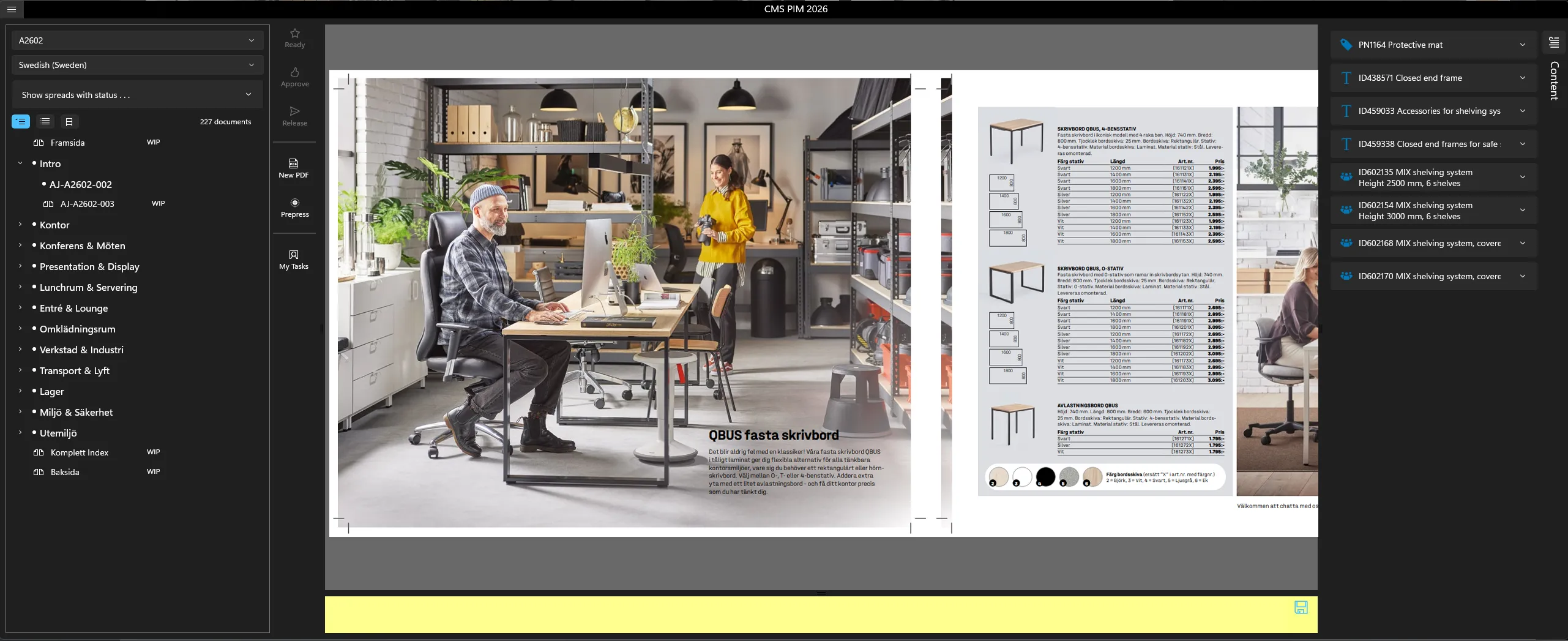
Content management over the PIM. Editors browse and edit the publishing hierarchy — publications, sections, editions, and the products, groups and copy-texts inside them — through a responsive native UI backed by the PIM’s REST API. A publication opens as a tree of its catalogue sections with a live document count and a work-in-progress status on each spread, next to a preview of the spread itself.
Prepress job dispatch. From the same client, users start print-production jobs, each one a distinct operation in the InDesign automation pipeline:
- Book pages — low-resolution book page generation
- High-colour PDFs
- High-language PDFs — multi-language output
- Price updates
- Prices with high-language PDFs, combined
- Merge PDF spreads
- Reference and colour low-resolution
- Export test
Secure by default. Sign-in is via Microsoft Entra ID and every runtime secret comes from Azure Key Vault, so no credentials live on disk. Telemetry and diagnostics flow to the cloud.
How it’s built
| Area | Technology |
|---|---|
| UI framework | WinUI 3 / Windows App SDK |
| Language and runtime | C# on .NET (net*-windows10) |
| Pattern | MVVM via CommunityToolkit.Mvvm ([ObservableProperty], [RelayCommand], WeakReferenceMessenger) |
| DI | Microsoft.Extensions.DependencyInjection, services registered at startup |
| Data access | PIM REST API through a dedicated data-service layer |
| Identity | Microsoft Entra ID (ClientSecretCredential) |
| Secrets | Azure Key Vault |
| Packaging | MSIX with code signing |
The architecture in one line: view (XAML) → view-model (commands and properties) → service layer → PIM REST API → models update → UI refreshes via INotifyPropertyChanged. Communication between view-models is decoupled through a weak-reference message bus, and a clean service and dialog abstraction keeps the view-models testable.
Engineering highlights
- A native client, deliberately. Where a web app would have done, WinUI 3 gives power users a fast, responsive desktop experience with proper Windows integration and MSIX deployment.
- Cloud-native plumbing under a desktop shell. Entra ID sign-in and Key Vault secret retrieval mean enterprise-grade identity in a desktop app, with nothing sensitive on the machine.
- A pluggable prepress pipeline. Each print-production job type is modelled as its own operation, so extending the catalogue-to-InDesign automation with a new output format does not disturb the existing ones.
- Living on the frontier of the stack. The project carries a detailed, hard-won upgrade path covering the Windows App SDK, .NET LTS releases and their coupled dependency chains — the platform-maintenance work that keeps a real application shippable while its foundations move underneath it.
Impact
Editing catalogue content and driving print production became one modern, secure native client, replacing older tooling with a maintainable WinUI 3 and MVVM codebase wired into the company’s cloud identity and PIM.